





FAQ

You asked, we answered

Why me?

My response to this question is “Why not me?” This question is often wrapping a different and more difficult question. Why did God do this to you? Or why did God allow this?

Before I dig into this, I want to be clear. I am a Christian and believe in a powerful and loving God. I also believe we live in an imperfect and fallen world (that seems obvious). This reality is the foundation for my answer.

So, why me? Because I live in this world like everyone else. Being a Christian does not mean I will not suffer. It also does not mean that I did something to deserve it. While I know I am not perfect, I do not believe this disease is punishment for my sin. I do believe that disease and suffering are a part of our fallen world, and I am part of it.

When Sheila and I found out that I had ALS, we were sad and asked, why us? We leaned on our faith and trust in God. We trusted that God has a plan for us. We still do. We don’t know what His plans are, but we trust Him. So, why not me? In some ways, I think that our faith makes us better equipped to live with ALS. It does not make it easier or without sadness. I don’t like having ALS, but I know God will be with me through it all. When my time on earth is over, I know I will be free of this disease and maybe I can ask God about his plan. Until then, I will trust and lean on Him.

“For I know the plans I have for you,” says the Lord. “They are plans for good and not for disaster, to give you a future and a hope.”

Jeremiah 29:11, NLT

Does it hurt?

This is a tricky question. ALS typically doesn’t cause pain itself. However, the effects of losing muscle can cause joint and ligament pain. I take Gabapentin to manage that specific pain. Other people with ALS have different experiences with pain. I also have had cramping and muscle aches. Most of my pain is managed with Gabapentin and Tylenol.

The other thing that helps a lot is when my caregivers do range of motion. Range of motion is when they move and stretch my limbs. This can keep my joints and what is left of my muscles limber. This tends to reduce stiffness which helps keep the pain away.

Can you feel this?

Yes! ALS does not affect my ability to feel someone’s touch or pain. I actually like human touch. I have found that I miss hugs, holding hands, and other touches. These help me connect more closely with people. Be aware this is how I feel not everyone feels the same.

I also feel pain. We cannot protect ourselves so be careful when helping us. We appreciate the help but use caution.

What is ALS?

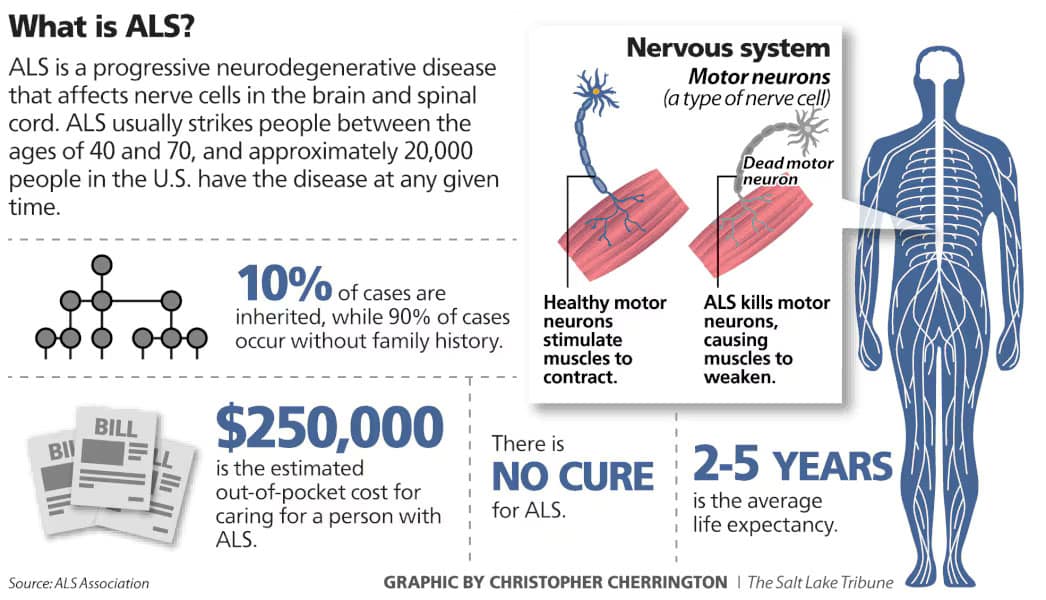
Amyotrophic lateral sclerosis (ALS), also known as Lou Gehrig’s disease, is a progressive neurodegenerative disorder that affects motor neurons in the brain and spinal cord. These neurons control voluntary muscle movements such as walking, speaking, swallowing, and breathing. As the disease progresses, motor neurons degenerate and die, leading to muscle weakness, twitching, atrophy, and eventually paralysis[1].

NOTE: ALS is also referred to as motor neuron disease or MND.

Key Facts:

  • Cause: The exact cause of ALS is unknown. Most cases are sporadic, but about 5–10% are familial, linked to genetic mutations such as in the SOD1 gene[2].
  • Symptoms: Early signs include muscle weakness, cramps, twitching, slurred speech, and difficulty swallowing. As ALS advances, it affects mobility, speech, and breathing[3].
  • Diagnosis: Diagnosis involves clinical evaluation, electromyography (EMG), nerve conduction studies, and ruling out other conditions[4].
  • Progression: ALS is typically fatal within 2 to 5 years of symptom onset, although some individuals live longer. It does not usually affect cognitive functions, though some may develop frontotemporal dementia (FTD-ALS)[1].
  • Treatment: There is no cure, but FDA-approved medications like riluzole and edaravone may slow progression. Supportive care includes physical therapy, speech therapy, and respiratory support[1].

For more detailed information, you can explore resources from:

References

[1] www.ninds.nih.gov

[2] www.cdc.gov

[3] www.mayoclinic.org

[4] www.urmc.rochester.edu

[5] www.als.org

What is the ALSFRS-R score?

The ALS Functional Rating Scale – Revised (ALSFRS-R) is the most widely used clinical tool for assessing physical function and disease progression in individuals with amyotrophic lateral sclerosis (ALS). It was introduced in 1999 as an update to the original ALSFRS (1991) to better capture respiratory function alongside bulbar and limb domains[1].

Purpose

ALSFRS-R measures functional decline over time, helping clinicians monitor disease progression, guide treatment decisions, and evaluate interventions in clinical trials. It is considered a gold standard for ALS severity assessment[1].

Structure

  • 12 items grouped into three functional domains:
    • Bulbar: speech, salivation, swallowing
    • Motor: handwriting, cutting food, dressing/hygiene, turning in bed, walking, climbing stairs
    • Respiratory: dyspnea, orthopnea, respiratory insufficiency[2]
  • Each item is scored on a 5-point scale (0–4):
    • 0 = no function
    • 4 = normal function
  • Total score range: 0–48 (higher scores indicate better function)[3].

Clinical Use

  • Tracks progression: average decline is about 1 point per month, though individual rates vary[4].
  • Used in clinical trialsprognostic modeling, and staging systems like MiToS and King’s staging[3].

Limitations

  • Does not fully account for differences in onset type (bulbar vs limb vs respiratory).
  • Floor effect in advanced stages; extended versions (ALSFRS-EX) and self-explanatory versions (ALSFRS-R-SE) have been developed to address these issues[3].

For more details, see:


References

[1] resref.com

[2] www.mdcalc.com

[3] en.wikipedia.org

[4] www.alspathways.com

Here’s a detailed ALSFRS-R scoring table showing all 12 items and their 0–4 scoring criteria:


ALSFRS-R Scoring Table

DomainItemScore 4 (Normal)Score 3 (Mild Impairment)Score 2 (Moderate)Score 1 (Severe)Score 0 (None)
BulbarSpeechNormal speechDetectable speech disturbanceIntelligible with repeatingSpeech combined with non-verbalLoss of useful speech
SalivationNormalSlight excess salivaModerately excessiveMarked droolingSevere drooling
SwallowingNormalOccasional chokingDietary consistency changesNeeds tube feeding for someTube feeding only
Motor – Upper LimbHandwritingNormalSlow or sloppyNot all words legibleAble to grip pen onlyUnable to grip pen
Cutting food & handling utensilsNormalSome difficulty, no helpNeeds help for some tasksNeeds help for most tasksUnable
Dressing & hygieneNormalIndependent but slowNeeds some assistanceNeeds much assistanceTotally dependent
Motor – Lower LimbTurning in bedNormalSomewhat slowNeeds occasional helpNeeds frequent helpUnable
WalkingNormalEarly ambulation difficultyWalks with assistanceNon-ambulatoryUnable
Climbing stairsNormalSlow or mild difficultyNeeds assistanceCannot climb stairsUnable
RespiratoryDyspneaNoneOccasional shortness of breathShortness on exertionShortness at restSevere at rest
OrthopneaNoneSome difficulty lying flatNeeds extra pillowsCannot lie flatUnable
Respiratory insufficiencyNoneIntermittent BiPAP useRegular BiPAP useContinuous BiPAP useVentilator dependent

Total Score Range: 0–48 (higher = better function).

What is FVC for breathing?

Forced Vital Capacity (FVC) is a key measurement in respiratory health that represents the maximum volume of air a person can forcefully exhale after taking the deepest breath possible. It is typically assessed using spirometry, a common pulmonary function test[1].

Purpose and Clinical Significance

  • Diagnostic Role: FVC helps distinguish between obstructive lung diseases (e.g., asthma, COPD) where exhalation is impaired, and restrictive lung diseases (e.g., pulmonary fibrosis) where inhalation is limited[2].
  • Monitoring: It is used to track disease progression, evaluate treatment effectiveness, and assess readiness for surgery or rehabilitation programs[2].

How It’s Measured

The test involves maximal inhalation followed by a forceful, complete exhalation until no more air can be expelled. This maneuver measures lung capacity and airflow dynamics[3].

FVC is often interpreted alongside FEV1 (Forced Expiratory Volume in 1 second) and the FEV1/FVC ratio, which are critical for diagnosing airflow obstruction[4].

Normal Values

  • Normal FVC values vary by age, sex, height, and ethnicity. Typically, an FVC within 80–120% of predicted values is considered normal. Adult males often range between 4.8–6.0 L, and females between 3.2–4.5 L[5].

Key Formula

$ text{FVC} = text{Tidal Volume (VT)} + text{Inspiratory Reserve Volume (IRV)} + text{Expiratory Reserve Volume (ERV)} $ This reflects the total air expelled after a full inhalation[1].

For more details, see:


References

[1] www.respiratorytherapyzone.com

[2] www.verywellhealth.com

[3] www.numberanalytics.com

[4] www.lung.org

[5] spirometry.com

What is AAC software?

AAC (Augmentative and Alternative Communication) software is designed to support individuals who have difficulty with verbal speech due to physical, developmental, or cognitive challenges. Here’s a concise summary:


Purpose:
AAC software helps people communicate more effectively when speech is limited or absent. It can be used by individuals with conditions such as autism, cerebral palsy, ALS, stroke, or traumatic brain injury.

Types of AAC:

  • Unaided AAC: Uses gestures, sign language, or facial expressions.
  • Aided AAC: Involves tools or devices, including software on tablets, smartphones, or dedicated speech-generating devices.

Key Features:

  • Text-to-Speech (TTS): Converts typed or selected words into spoken language.
  • Symbol-Based Communication: Uses icons or pictures (e.g., PECS, Boardmaker) to represent words or phrases.
  • Customizable Vocabulary: Allows users to tailor words and phrases to their needs.
  • Touchscreen Interface: Often designed for ease of use with touch or switch access.
  • Multilingual Support: Some AAC apps support multiple languages and dialects.

Popular AAC Software Examples:

  • Communicator
  • TD Snap
  • Proloquo2Go
  • TouchChat HD
  • Snap + Core First
  • Avaz
  • Grid 3

Benefits:

Can be used in educational, clinical, and home settings.

Enhances independence and social interaction.

Supports language development and literacy.

What is AAC and what are common AAC myths? – Tobii Dynavox Global

What is eye gaze?

🧠 What Is Eye Gaze Technology and How Does It Work?

Eye gaze technology (also known as eye tracking) allows a computer to determine exactly where you are looking and convert that into control of a cursor, keyboard, or communication system.

For individuals with limited mobility—especially those living with ALS—this technology can replace traditional input devices and provide a pathway to communication, productivity, and independence.


🔍 The Core Concept Behind Eye Tracking

At its foundation, eye tracking is a combination of optical hardware and mathematical modeling. It relies on:

  • Infrared (IR) illumination
  • High-speed camera sensors
  • Real-time software processing

These components work together to track the position of your eyes and translate that into a precise point on a screen. [tobii.com]

The most widely used method is called:

PCCR (Pupil Center Corneal Reflection) — the relationship between your pupil and a reflection on your eye is used to determine gaze direction. [scienceinsights.org]


⚙️ Step-by-Step: How Eye Gaze Technology Works

1. Infrared Light Illuminates Your Eyes

An eye tracker emits near-infrared light, which is invisible and safe.

  • The light reflects off two key parts:
    • The pupil
    • The cornea (front of the eye)
  • This creates a bright reflection point called a**“glint”**. [scienceinsights.org]

Why infrared?

  • It creates strong visual contrast
  • It works across different lighting conditions
  • It doesn’t distract the user [scienceinsights.org]

2. Cameras Capture Eye Position

Small, specialized cameras capture images of your eyes continuously.

They track:

  • Pupil center
  • Reflection points (glints)
  • Eye orientation and movement

These cameras can capture dozens to hundreds of frames per second depending on the device. [scienceinsights.org]


3. Software Calculates Gaze Direction

The system compares:

  • The position of the pupil
  • The position of the reflection (glint)

As your eyes move:

  • The pupil shifts
  • The reflection remains relatively stable

The system calculates the difference between the two and converts it into a gaze vector (direction). [scienceinsights.org]


4. Calibration Creates a Personalized Model

Before using the system, you complete a calibration process:

  • You follow dots across the screen
  • The system learns how your eyes map to screen positions

Calibration is critical—it directly impacts accuracy and usability. [tobii.com]


5. Real-Time Mapping to Screen Coordinates

Once calibrated:

  • Your gaze is translated into X/Y coordinates
  • The cursor moves in real time (milliseconds delay)

Modern systems continuously refine accuracy as you use them.


6. Clicking Without Hands

Since there is no mouse, eye tracking uses alternative “click” methods:

  • Dwell clicking (look at something briefly)
  • Blink detection
  • External switches (adaptive devices)
  • Voice commands

🎯 Key Eye Movement Concepts

Eye trackers don’t just detect “where” you look—they analyze behavior:

  • Fixations → when your eyes pause on something
  • Saccades → rapid jumps between points
  • Dwell time → how long you look at something

These metrics are used both for interaction and for analyzing attention and decision-making. [scienceinsights.org]


🧩 Types of Eye Tracking Systems

Screen-Based Trackers

  • Mounted below a monitor
  • Most common for AAC and computer control

Dedicated AAC Devices

  • All-in-one systems with built-in eye tracking
  • Designed for communication and daily use

Wearable Eye Trackers

  • Built into glasses
  • Used for real-world tracking or research

🎯 What Affects Accuracy?

Improves AccuracyReduces Accuracy
Good calibrationGlass glare
Stable head positionBright sunlight
Consistent lightingFatigue
High-quality trackerDrooping eyelids

♿ Why Eye Gaze Technology Matters

Eye tracking enables:

  • Full computer control
  • Speech generation (AAC apps)
  • Smart home interaction
  • Content creation and communication

In many cases, it becomes the primary interface between a user and the digital world.


🧠 A Simple Way to Think About It

Eye tracking is essentially:

  • A camera watching your eyes
  • A model that understands what that means
  • A system that turns that into action

👉 Your eyes become your mouse, keyboard, and voice


🏆 The Best Eye Trackers (2026)

When evaluating eye trackers, the biggest dividing line is this:

Consumer-grade (gaming/testing) vs Assistive-grade (daily independence)

Below is a clear breakdown of the most relevant devices.


🥇 Tobii Dynavox PCEye (Best Overall)

Best for: Full computer control and flexibility

Key Features

What You Can Do

  • Browse the web
  • Create documents
  • Use AI tools
  • Control apps and smart devices

Tradeoffs

  • Setup required (mounting, positioning)
  • Higher cost (~$3K range)

Verdict: Best balance of power, flexibility, and independence


🥈 Tobii Dynavox TD I‑Series (I‑13 / I‑16)

Best for: Turnkey communication device

Key Features

  • Built specifically for ALS and similar conditions [tobiidynavox.com]
  • Fully eye-controlled speech generating device
  • Works in bright light and outdoor environments [tobiidynavox.com]
  • Includes:
    • TD Snap (symbol-based AAC)
    • Communicator 5 (text-based AAC)
    • TD Control for Windows

Hardware Advantages

  • Built-in speakers
  • Battery-powered
  • Durable design
  • Mounting ecosystem

Tradeoffs

  • Expensive ($8K+ typical)
  • Less customizable than PC setups

Verdict: Best for plug-and-play reliability


🥉 EyeTech / Smartbox Ecosystem

Best for: Grid 3 users and custom AAC setups

Key Features

Strengths

  • Strong communication workflows
  • Flexible AAC customization

Limitations

  • Smaller ecosystem than Tobii
  • Requires more setup knowledge

Verdict: Best if you’re already using Grid


🧪 Eyegaze Edge (LC Technologies)

Best for: Long sessions and fatigue reduction

Strengths

  • Designed with ALS users
  • Focus on accuracy and stability

Limitations

  • Older interface
  • Smaller ecosystem

Verdict: Reliable, but less modern than competitors


⚠️ Budget Option: Tobii Eye Tracker 5

Best for: Trying eye tracking cheaply

Reality Check

  • Designed for gaming—not assistive use
  • Missing:
    • AAC integration
    • Full Windows control
    • Reliability for daily use

Verdict: Good for experimentation—not independence


🔍 Quick Comparison Table

DeviceBest Use CaseStrengthLimitation
PCEyeFull PC controlFlexible, powerfulSetup required
TD I-SeriesCommunicationReliable, turnkeyExpensive
EyeTech / SmartboxGrid usersAAC customizationSmaller ecosystem
Eyegaze EdgeLong sessionsStableOlder UX
Eye Tracker 5TestingCheapNot assistive-grade

🧠 Final Recommendation

For most advanced users:

  • Best Overall: Tobii Dynavox PCEye
  • Simplest Option: TD I‑Series
  • Budget Experiment: Eye Tracker 5 (with caution)

⚠️ Important Reality Check

Regardless of device:

  • Calibration is critical
  • Lighting and positioning matter
  • Accuracy varies per user
  • Trialing devices is highly recommended

🔗 References and Further Reading

Below are authoritative sources and product pages if you want to go deeper.


📘 How Eye Tracking Works (Technical)


🖥️ Major Eye Tracking Devices


🧩 Alternative Ecosystems


✅ Closing Thought

Eye gaze technology isn’t just about accessibility—it’s about control.

With the right setup, your eyes become:

  • Your mouse
  • Your keyboard
  • Your voice

And that opens the door to full digital independence.


Have a question? Ask away!

First
Last