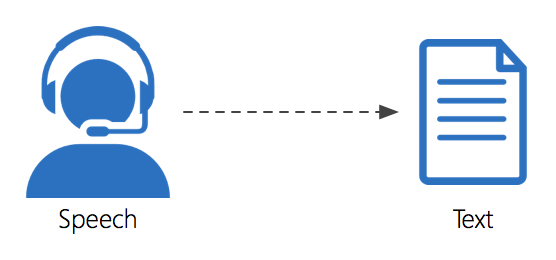
Voice to text & voice control

Early on in my diagnosis, I lost the use of my hands making typing more difficult then impossible. Over a couple of years, I tried many different voice to text options to compensate for the lack of functionality. I highly recommend Voice Access. My experience with the application and the Microsoft product team was very good. The application enabled me to continue working at my company in spite of the ALS progression.

Description

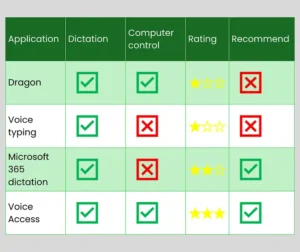
I summarized my experience in the following table.
I wrote multiple blogs about my experience with these technologies.

Typing with Your Tongue – Voice to Text Technologies
Typing with Your Tongue Part 2: Voice Access
Demonstrating How I Use Voice Access

You can see that I highly recommend Voice Access. My experience with the application and the Microsoft product team was very good. The application enabled me to continue working at my company in spite of the ALS progression.

Voice Access is free in all editions of Windows 11.

You can find my training videos in the Video Library.

Learn more 
Additional information

Steve’s ALS stage

Early, Late, Middle

ALS toolboxes

We are using these stages to help you understand when these tools and apps were most effective for Steve.

EARLY STAGE | July 2021 – November 2022

From first symptoms to the walker

Key points
• No ventilation
• Able to walk without help
Limited upper limb function

MIDDLE STAGE | November 2022 – August 2023

From walker to power chair

Key points
• Limited ventilation with an NIV
• Help needed to transfer
Limited upper and lower limb function
• Work transitions
Supplemental nutrition through feeding tube

LATE STAGE | August 2023 – Current

Power chair

Key points
• 50% to full time ventilation
• From NIV to tracheostomy
Lift transfers
Loss of limb function
Most nutrition through feeding tube

Reviews

There are no reviews yet.

Be the first to review “Voice to text & voice control”

Your email address will not be published. Required fields are marked *